# React Hooks: useRef
## 1. Definition
**useRef** is a built-in React hook that accepts one argument as the initial value and returns a reference (aka ref).
A reference is an object having a special property `current`
There are two main uses of **useRef**;
- Accessing the DOM nodes or React elements
- Keeping a mutable variable.
```jsx
const refContainer = useRef(initialValue);
```
## 2. Accessing the DOM Elements
**This is performed in 3 steps:**
1. Define the reference to access the element
2. Assign the reference to `ref` attribute of the element
3. After mounting, `elementRef.current` points to the DOM element.
This is equivalent of
```jsx
import React, { useRef } from "react";
const CustomTextInput = () => {
const textInput = useRef();
focusTextInput = () => textInput.current.focus();
return (
<>
);
}
```
## 3. Keeping a Mutable Variable
We have two ways of keeping data between re-renders:
- **In the component state**: Every time the state changes, the component will be re-rendered.
- **In an instance variable**: The variable will persist for the full lifetime of the component. Changes in an instance variable won’t generate a re-render.
---
In functional components this would be;
- **In a state variable**: `useState` or `useReducer`. Updates in state variables will cause a re-render of the component.
- **In a ref:** Equivalent to instance variables in class components. Mutating the `.current` property won’t cause a re-render.
## 4. Updating Ref
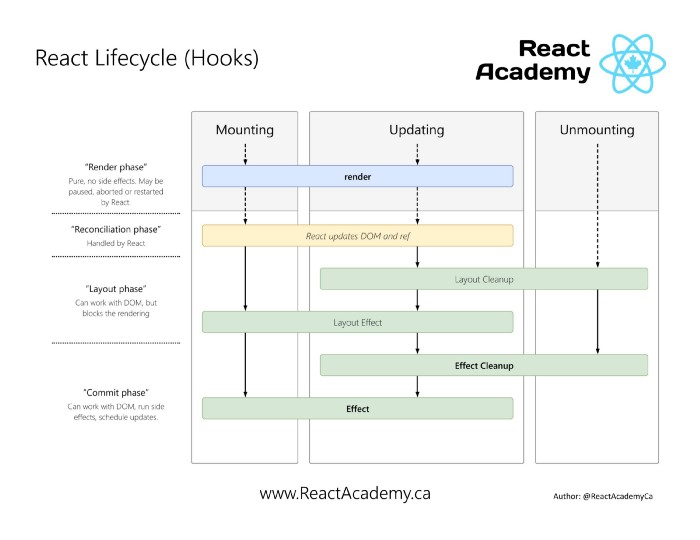
Updating a ref variable is a side effect therefore needs to be done inside **useEffect or useLayoutEffect**
In React all side effect should be inside Layout Phase.
```jsx
import React, { useRef } from "react";
const RenderCounter = () => {
const counter = useRef(0);
useEffect(() => {
// Every time the component has been re-rendered,
// the counter is incremented
counter.current = counter.current + 1;
});
return (
{`The component has been re-rendered ${counter} times`}
);
};
```
## 5. Summary
The useRef Hook lets us create mutable variables inside functional components.
There are three main key points that you should keep in mind when using the useRef Hook;
- A ref created with useRef will be created only when the component **has been mounted** and preserved for the full lifecycle.
- Refs can be used for accessing DOM nodes or React elements, and for storing mutable variables (like with instance variables in class components).
- **Updating a ref is a side effect** so it should be done only inside a **useEffect (or useLayoutEffect) or inside an event handler.**
## Links
- [Hooks API Reference - React](https://reactjs.org/docs/hooks-reference.html#useref)
- [React useRef Hook](https://medium.com/trabe/react-useref-hook-b6c9d39e2022)
- [The Complete Guide to useRef() and Refs in React](https://dmitripavlutin.com/react-useref-guide/)